.gif "Vizrt")
RRP: £19,899.00
Your Price: N/A
Mfr. Part #: BDL-000000009
Our Part #: VIZ3P22RU
EAN #:
Description
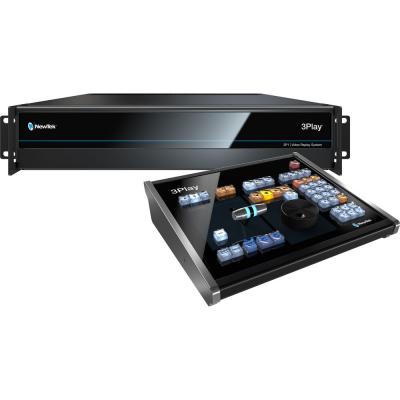
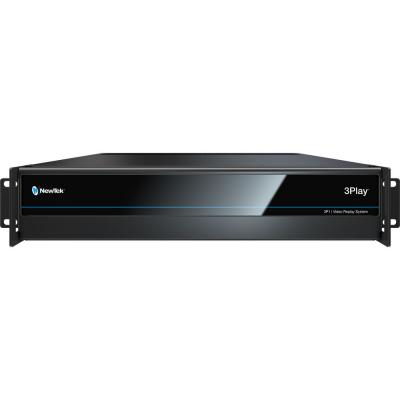
For sports broadcasters or anyone needing 4K and beyond instant replays from NDI and/or 3G-SDI inputs, the NewTek 3Play 3P2 is a 10-channel sports replay and telestration system that combines with popular live production systems to provide a complete, cost-effective, UHD 4K60 end-to-end IP-based live event production workflow. An included 3Play Control Surface allows for an efficient hands-on approach for added flexibility, while even on its own, the 3Play 3P2 offers an integrated system with a comprehensive set of real-time capabilities.
The 3Play 3P2 supports a mix of eight NDI inputs (via two NICs), four SDI inputs, and two SDI or NDI outputs. A single quad-link SDI output is additionally available for UHD 4K output. The system allows 3P2 and TriCaster devices to access shareable playlists by syncing playlists on the network. With simultaneous capture streams, integrated dual-channel NewTek NDI Telestrator capabilities, playback zoom and tracking, clip publishing, automatic session cleanup, and numerous other features, the 3Play 3P2 provides the connectivity and tools to never miss an angle or important moment. The built-in features allow faster delivery of replays from more angles to provide audiences with optimal viewing experiences.
Bookmarks
Set timecode markers to quickly navigate to key moments during recorded events, independent of marked in and out points.
Filter
Locate relevant clips and events quickly and easily, filtering content using keywords and metadata.
List Organization
Organize content to preference with multiple Clips List and Play List pages, arranging assets by team, player, play type, time period, and more.
MAM Platform Integration
Integrate with compatible Media Asset Management (MAM) platforms for shared use and management of stored media assets.
Metadata
Enter text notes and descriptions for assets to easily identify, organize, and manage content.
Tags
Save time and effort tagging replay events, entering detailed metadata with fewer keystrokes by using custom numeric codes for keywords and phrases.
Audio Configuration
Designate the sound that accompanies each video input for capture, with independent configuration of audio channel and input type.
Mix-and-Match Audio Connections
Use any combination of supported digital, analog, and network audio devices to input and output high-quality audio.
Automatic Replay Recording
Activate recording automatically when you set your first Mark In or Mark Out point.
Multi-Channel Recording
Capture every angle of live action for instant replay, playback, or archive, recording multiple, native-resolution video channels simultaneously.
Synchronized, Continuous Capture
Record footage from all active video channels continuously, simultaneously, and in perfect sync, until you manually deactivate recording.
Auto Color
Optionally enable automatic color matching between video inputs to account for variable lighting conditions and camera settings.
Proc Amp Controls
Individually adjust color characteristics and levels for each input source, including brightness, contrast, hue, and saturation.
Recording Options
Choose the destination drive for each active recording and other assets associated with your 3Play session.
Sessions
Configure and store the framework and assets for your productions, including the video standard and resolution, input and output configuration, and more.
Session Templates
Set up and store session settings with your user preferences in reusable templates, and jump right to your custom configuration for any production.
White Balance
Ensure accurate color properties for your video with manual and automatic white balance controls.
Control Panels
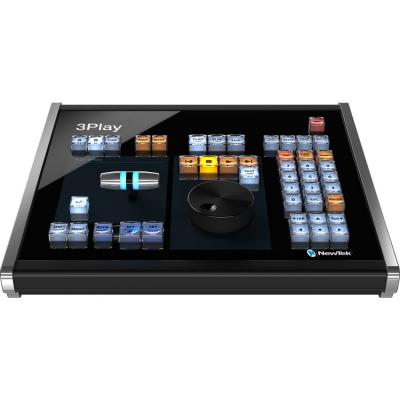
Take a hands-on approach to operation with the included 3Play Control Surface that maps to the user interface.
Event Marking
Start and end events and clips at the exact frame you want with pinpoint Mark In and Mark Out controls.
Macros
Record, store, and automate favorite settings, frequent commands, and complex operation sequences, triggering with a single action.
MIDI Support
Optionally connect any of thousands of compatible MIDI devices to extend macro control and to integrate video operations with other MIDI-compatible live production elements like sound, lighting, and effects.
Program-Preview Workflow
Sequence and switch between output channels using your choice of transitions, and set up and see the composition of your next shot before you take it live to air.
Transport Controls
Use a simple set of familiar controls to manage playback and list functions, including Play, Stop, Previous, and Next.
User Interface
Operate with point-and-click simplicity, with a dedicated software user interface and the included USB mouse and keyboard.
Web Interface
Optionally enable control from the browser of any supported device on the same network with a system-specific Web-based interface.
3G/HD/SD-SDI
Industry-standard SDI input and output connectivity with support for 3G, HD, and SD video formats.
AMP Support
Enable compatible third-party systems supporting AMP (Advanced Media Protocol) to issue commands to 3Play for more fluid and sophisticated workflows.
Genlock
Synchronize the timing with other equipment in your production environment using an external reference signal.
Mix-and-Match Video Inputs
Connect video cameras or devices of any supported connection type, resolution, frame rate, and aspect ratio, with per-input configuration.
Mix-and-Match Video Outputs
Configure video outputs for any combination of supported signals and connection types.
Rackmount Chassis
Industry-standard rackmount chassis integrate into any professional production environment, setup, or workflow.
Router Support
Select and switch between router sources directly from the user interface when connected to a compatible upstream video router.
Scores and Statistics
Display real-time scores and statistics in on-screen graphics using compatible network graphics solutions.
Storage
Import, record, and store hours of video, images, graphics, and more for your production using supported storage methods.
Features:
• Complete UHD 4K End-to-End IP Workflow
• 10-Channel Sports Replay System
• 8 Simultaneous Capture Streams
• 8 x NDI (via 2 NICs) & 4 x 3G-SDI Inputs
• 2 Session-Format Simultaneous IP/SDI Out
• 2 x Session-Format IP Outputs via NDI
• Full Transitions, Audio & Sound Effects
• Playback Zoom and Tracking
• Shareable Playlists
• Integrated Dual-Channel Telestration
For sports broadcasters or anyone needing 4K and beyond instant replays from NDI and/or 3G-SDI inputs, the NewTek 3Play 3P2 is a 10-channel sports replay and telestration system that combines with popular live production systems to provide a complete, cost-effective, UHD 4K60 end-to-end IP-based live event production workflow. An included 3Play Control Surface allows for an efficient hands-on approach for added flexibility, while even on its own, the 3Play 3P2 offers an integrated system with a comprehensive set of real-time capabilities.
The 3Play 3P2 supports a mix of eight NDI inputs (via two NICs), four SDI inputs, and two SDI or NDI outputs. A single quad-link SDI output is additionally available for UHD 4K output. The system allows 3P2 and TriCaster devices to access shareable playlists by syncing playlists on the network. With simultaneous capture streams, integrated dual-channel NewTek NDI Telestrator capabilities, playback zoom and tracking, clip publishing, automatic session cleanup, and numerous other features, the 3Play 3P2 provides the connectivity and tools to never miss an angle or important moment. The built-in features allow faster delivery of replays from more angles to provide audiences with optimal viewing experiences.
Bookmarks
Set timecode markers to quickly navigate to key moments during recorded events, independent of marked in and out points.
Filter
Locate relevant clips and events quickly and easily, filtering content using keywords and metadata.
List Organization
Organize content to preference with multiple Clips List and Play List pages, arranging assets by team, player, play type, time period, and more.
MAM Platform Integration
Integrate with compatible Media Asset Management (MAM) platforms for shared use and management of stored media assets.
Metadata
Enter text notes and descriptions for assets to easily identify, organize, and manage content.
Tags
Save time and effort tagging replay events, entering detailed metadata with fewer keystrokes by using custom numeric codes for keywords and phrases.
Audio Configuration
Designate the sound that accompanies each video input for capture, with independent configuration of audio channel and input type.
Mix-and-Match Audio Connections
Use any combination of supported digital, analog, and network audio devices to input and output high-quality audio.
Automatic Replay Recording
Activate recording automatically when you set your first Mark In or Mark Out point.
Multi-Channel Recording
Capture every angle of live action for instant replay, playback, or archive, recording multiple, native-resolution video channels simultaneously.
Synchronized, Continuous Capture
Record footage from all active video channels continuously, simultaneously, and in perfect sync, until you manually deactivate recording.
Auto Color
Optionally enable automatic color matching between video inputs to account for variable lighting conditions and camera settings.
Proc Amp Controls
Individually adjust color characteristics and levels for each input source, including brightness, contrast, hue, and saturation.
Recording Options
Choose the destination drive for each active recording and other assets associated with your 3Play session.
Sessions
Configure and store the framework and assets for your productions, including the video standard and resolution, input and output configuration, and more.
Session Templates
Set up and store session settings with your user preferences in reusable templates, and jump right to your custom configuration for any production.
White Balance
Ensure accurate color properties for your video with manual and automatic white balance controls.
Control Panels
Take a hands-on approach to operation with the included 3Play Control Surface that maps to the user interface.
Event Marking
Start and end events and clips at the exact frame you want with pinpoint Mark In and Mark Out controls.
Macros
Record, store, and automate favorite settings, frequent commands, and complex operation sequences, triggering with a single action.
MIDI Support
Optionally connect any of thousands of compatible MIDI devices to extend macro control and to integrate video operations with other MIDI-compatible live production elements like sound, lighting, and effects.
Program-Preview Workflow
Sequence and switch between output channels using your choice of transitions, and set up and see the composition of your next shot before you take it live to air.
Transport Controls
Use a simple set of familiar controls to manage playback and list functions, including Play, Stop, Previous, and Next.
User Interface
Operate with point-and-click simplicity, with a dedicated software user interface and the included USB mouse and keyboard.
Web Interface
Optionally enable control from the browser of any supported device on the same network with a system-specific Web-based interface.
3G/HD/SD-SDI
Industry-standard SDI input and output connectivity with support for 3G, HD, and SD video formats.
AMP Support
Enable compatible third-party systems supporting AMP (Advanced Media Protocol) to issue commands to 3Play for more fluid and sophisticated workflows.
Genlock
Synchronize the timing with other equipment in your production environment using an external reference signal.
Mix-and-Match Video Inputs
Connect video cameras or devices of any supported connection type, resolution, frame rate, and aspect ratio, with per-input configuration.
Mix-and-Match Video Outputs
Configure video outputs for any combination of supported signals and connection types.
Rackmount Chassis
Industry-standard rackmount chassis integrate into any professional production environment, setup, or workflow.
Router Support
Select and switch between router sources directly from the user interface when connected to a compatible upstream video router.
Scores and Statistics
Display real-time scores and statistics in on-screen graphics using compatible network graphics solutions.
Storage
Import, record, and store hours of video, images, graphics, and more for your production using supported storage methods.
Features:
• Complete UHD 4K End-to-End IP Workflow
• 10-Channel Sports Replay System
• 8 Simultaneous Capture Streams
• 8 x NDI (via 2 NICs) & 4 x 3G-SDI Inputs
• 2 Session-Format Simultaneous IP/SDI Out
• 2 x Session-Format IP Outputs via NDI
• Full Transitions, Audio & Sound Effects
• Playback Zoom and Tracking
• Shareable Playlists
• Integrated Dual-Channel Telestration